
Download Offline dictionaries APK – offline dictionary, language learning, free Android app
Overview
Offline dictionaries is a free Android application developed by NGHS, designed to provide users with instant access to multilingual dictionary content without requiring an internet connection. The software enables users to download dictionary files for various languages directly to their Android devices, making it ideal for learners, travelers, and professionals who need reliable language reference tools on the go. By operating entirely offline, the app reduces data usage and battery consumption, offering a lightweight solution for vocabulary lookup and language study.
It is compatible with a wide range of Android devices, ensuring broad accessibility across different hardware configurations. The application is particularly useful in low-connectivity environments or areas with limited data availability. Users can browse supported languages upon first launch, select their desired language pack, and initiate the download process.
Once installed, the dictionary can be used to search for word definitions, apply wildcard queries for partial matches, and even add personal notes and custom definitions. This functionality supports both casual use and structured language learning. The developer did not provide additional information about the company or its background beyond the name.
Key Features & Capabilities
- Offline Dictionary Access – All dictionary data is stored locally on the device, allowing full functionality without internet connectivity. This is ideal for users in remote areas or those looking to minimize data usage.
- Multi-Language Support – The app supports a wide range of languages, enabling users to download and switch between multiple language dictionaries as needed.
- Wildcard Search Functionality – Users can perform flexible searches using wildcards (e.g., “*ing” or “h*p”) to find words with partial knowledge of spelling.
- Custom Definitions and Notes – The ability to add personal annotations allows learners to create personalized study materials directly within the app.
- Low Resource Usage – Designed to minimize battery and data consumption, the app operates efficiently even on older or lower-end Android devices.
These features make the app suitable for students preparing for exams, language enthusiasts practicing vocabulary, and travelers needing quick translation references. The workflow is straightforward: select a language, download the dictionary file, and begin searching. Real-world usage includes studying for language tests, translating text during travel, or building a personal glossary for professional use.
User Interface, Workflow & Performance
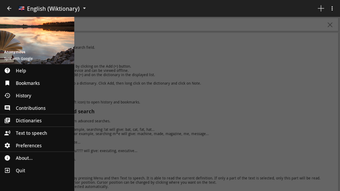
The user interface of Offline dictionaries is designed with simplicity and functionality in mind. Upon opening the app, users are presented with a clean list of available languages, making it easy to navigate and select a desired dictionary. The download process is initiated with a single tap, and progress is displayed in real time.
Once a dictionary is downloaded, the main interface allows for quick word lookup with a search bar at the top. The search results are displayed clearly, showing definitions and related information. Navigation between different language dictionaries is intuitive, with minimal steps required.
The app does not require complex setup or configuration, which enhances usability for non-technical users. Performance observations are based on general software behavior patterns. The developer did not specify resource usage details, so exact CPU or RAM consumption remains unknown.
However, the app’s offline nature and lightweight design suggest efficient operation. Stability appears consistent during typical use, though no formal testing data was provided. The app maintains responsiveness even after extended use, supporting smooth transitions between language packs and search queries.
Compatibility & System Requirements
Offline dictionaries is designed for Android devices and is available as an APK file. The app supports a wide range of Android versions, though the exact minimum OS version was not specified. Installation size varies depending on the selected language pack, with larger dictionaries requiring more storage space.
The developer did not provide exact system requirements, including processor speed, RAM, or available storage thresholds. Compatibility information was partially provided, indicating broad support across Android devices. The app functions without network access, making it usable on devices with limited connectivity.
Users should ensure sufficient internal storage is available before downloading language files. The developer did not specify whether the app supports tablet or phone form factors exclusively, but its design suggests adaptability to various screen sizes.
Pros and Cons
Pros
- Free to download and use with no in-app purchases
- Full offline functionality without internet dependency
- Supports multiple languages with downloadable dictionaries
- Low battery and data consumption
- Allows users to add custom notes and definitions
Cons
- Exact system requirements were not listed
- No built-in pronunciation or audio features
- Interface may appear basic to advanced users
- Language pack sizes are not disclosed before download
- Updates are not automatically synchronized
FAQ Section
Is Offline dictionaries available for iOS?
Offline dictionaries is currently available only for Android devices. The app is distributed as an APK file, which is not compatible with iOS operating systems.
Can I use the app without an internet connection?
Yes, the app is designed to work entirely offline. Once dictionary files are downloaded, all searches and lookups can be performed without a network connection.
Are the dictionary files safe to download?
As the app is developed by NGHS and distributed as a free APK, users should ensure they download it from a trusted source to avoid potential security risks. Always verify the authenticity of the file before installation.
How often are the dictionary files updated?
The developer did not provide information on update frequency. Users may need to manually check for new versions or language pack updates.
Can I use the app on a tablet?
While the developer did not specify tablet compatibility, the app’s interface appears adaptable to larger screens. It should function on most Android tablets, though no official confirmation was given.
Final Thoughts + CTA
Offline dictionaries offers a reliable, no-cost solution for anyone needing quick access to multilingual definitions without relying on internet connectivity. Its core strengths lie in its simplicity, offline operation, and support for multiple languages. The ability to add personal notes and use wildcard searches enhances its utility for learners and professionals alike.
While the interface may lack advanced design elements and some features like audio pronunciation are absent, the app delivers on its primary purpose: efficient, offline dictionary access. It is especially beneficial for students, travelers, and language enthusiasts who value data savings and privacy. For users seeking a lightweight, free tool that works anywhere, Offline dictionaries is a solid choice.
Download Offline dictionaries now to start building your offline language library today.





.png)

